---
title: Professional Conference - Exhibitor space - Admin set up
description: "This feature allows you to create exhibitor booths in your conference and facilitate interaction between attendees and exhibitors. \n\nIn this article learn how, as an event admin, you can add exhibitors and give them access to set up their booth."
---
[Skip to content](https://help.oxfordabstracts.com/knowledge/professional-conference-exhibitor-feature#main-content)
English
Show submenu for translations
[Didn't find the help you need?](https://help.oxfordabstracts.com/knowledge/kb-tickets/new?hsLang=en) [Customer portal](https://help.oxfordabstracts.com/tickets-view?hsLang=en)

Open main navigation
Close main navigation
- English
Show submenu for translations
- [Didn't find the help you need?](https://help.oxfordabstracts.com/knowledge/kb-tickets/new)
- [Customer portal](https://help.oxfordabstracts.com/tickets-view)
- Go to oxfordabstracts.com
Go to oxfordabstracts.com
How can we help?
- There are no suggestions because the search field is empty.
1. [Oxford Abstracts Knowledge Base](https://help.oxfordabstracts.com/knowledge?hsLang=en)
2. [The Conference Platform](https://help.oxfordabstracts.com/knowledge/the-conference-platform?hsLang=en)
3. [The Professional Conference features](https://help.oxfordabstracts.com/knowledge/the-conference-platform?hsLang=en#the-professional-conference-features)
# Professional Conference - Exhibitor space - Admin set up
## This feature allows you to create exhibitor booths in your conference and facilitate interaction between attendees and exhibitors. In this article learn how, as an event admin, you can add exhibitors and give them access to set up their booth.
The guidance below is for event administrators/ organisers. If you are an end user (eg. submitter, reviewer, delegate etc), please click [here](https://help.oxfordabstracts.com/knowledge/support?hsLang=en).
[Skip to written instructions](https://help.oxfordabstracts.com/knowledge/professional-conference-exhibitor-feature#Tex)
Skip to
[Adding your exhibitors](https://help.oxfordabstracts.com/knowledge/professional-conference-exhibitor-feature#ADD)
[Exhibitor settings](https://help.oxfordabstracts.com/knowledge/professional-conference-exhibitor-feature#EXH)
[Exhibitor table](https://help.oxfordabstracts.com/knowledge/professional-conference-exhibitor-feature#EXHT)
[Using exhibitors as session sponsor](https://help.oxfordabstracts.com/knowledge/professional-conference-exhibitor-feature#EXSS)
Admins have permission to access many of the features that the exhibitors use, so it will be helpful to learn how to edit the booth and understand the end user experience by reading [this article.](https://help.oxfordabstracts.com/knowledge/professional-conference-exhibitor-feature-exhibitor-set-up?hsLang=en)
### Adding your exhibitors
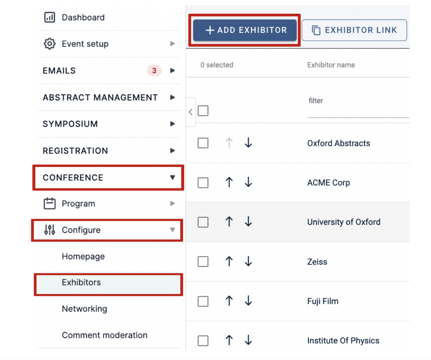
Go to **Event dashboard → Conference → Configure → Exhibitors**
To add your exhibitors to your conference, click the **Add Exhibitor** button
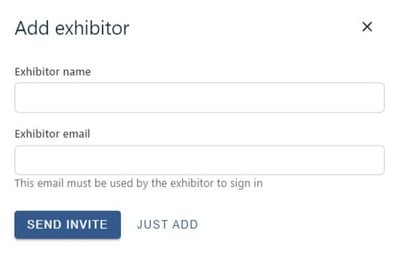
Then, enter the name of the company exhibiting and the primary email for the exhibitor. You can then choose to send an invite to the exhibitor, or just add the details without sending an invite.
**NB** : The email you add here will need to be used by the exhibitor to login to your event
Once you add the exhibitor, they will appear on the table and they can be invited to create their booth.
---
For guidance on emailing exhibitors, see [Creating custom emails](https://help.oxfordabstracts.com/knowledge/amending-template-emails?hsLang=en)
---
### Exhibitor settings
Go to **Event dashboard → Exhibitors**
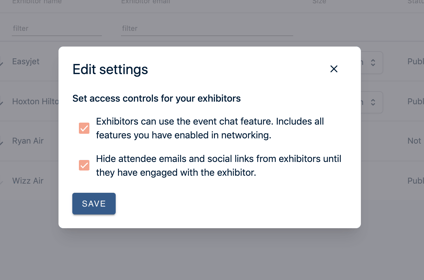
You can adjust the controls your exhibitors have via the **Edit Settings** button.

---
### Exhibitor table
Go to **Event dashboard → Exhibitors**
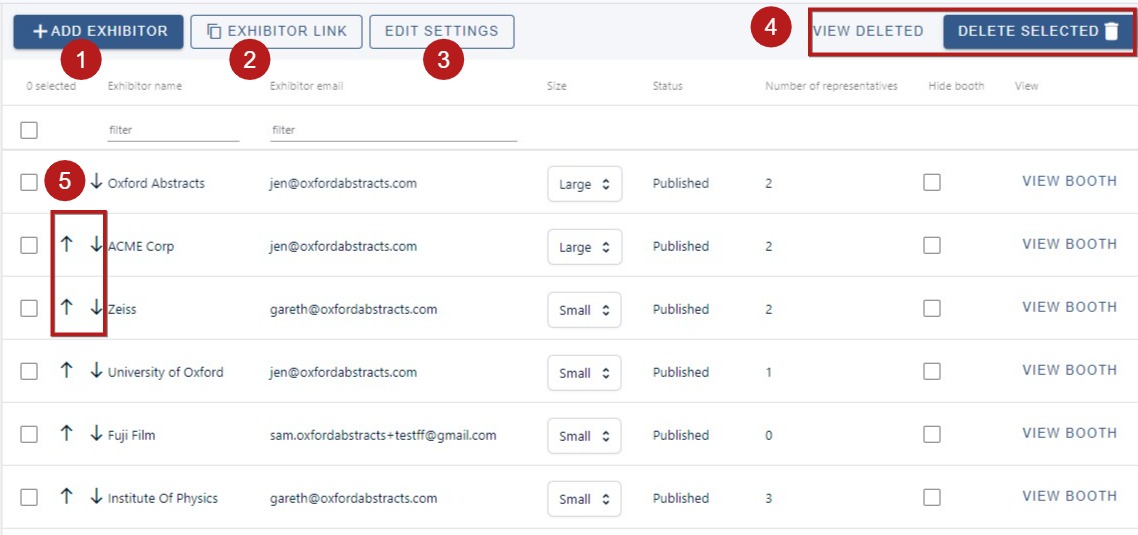
From the table you can access lots of information and complete several actions:
1\) Add exhibitor (as above)
2\) Copy and paste the Exhibitor sign up link (You can send this out to Exhibitors using the [Email function](https://help.oxfordabstracts.com/knowledge/creating-custom-emails?hsLang=en))
3\) [Edit settings](https://help.oxfordabstracts.com/knowledge/professional-conference-exhibitor-feature#SET). Clicking on this allows you to control the interactivity between exhibitors and attendees.
4\. Delete / restore exhibitors (To delete, see below)
5\. Change the order of exhibitors
On the main body of the table, you can
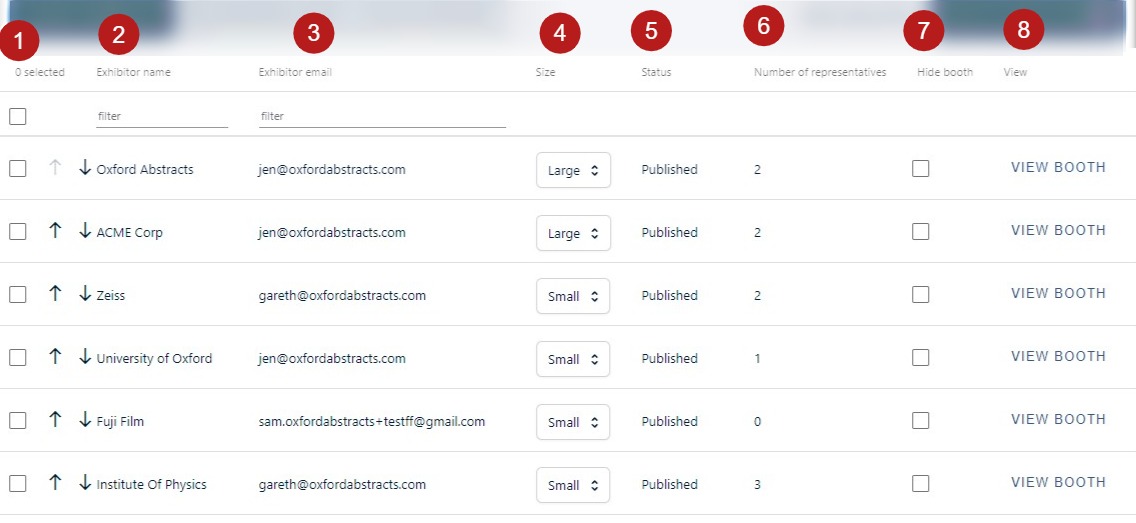
1\. Use the checkbox to select an entry (clicking the checkbox in the header will select all the rows on the page). You can then delete the entry via the **Delete selected** button
2\) and 3). View exhibitors' names and emails.
4\) Adjust the size of the booth
5\) See the status of the booth, updated by the exhibitors
6\) View the number of representatives
7\) Hide a booth from being seen by attendees.
8\) View the booth (this will take you to the booth view in the program, where you can edit it should you require)
The 'teaser page' is a preview screen showcasing all your exhibitors for attendees to browse. You can learn more in this [set up article](https://help.oxfordabstracts.com/knowledge/professional-conference-exhibitor-feature-exhibitor-set-up?hsLang=en)
---
### Settings
The gives you two options:
1\. Allowing exhibitors to use the chat functionality in your event. The attendee will always have to ‘accept’ the chat if the exhibitor makes first contact. If this isn’t checked they won’t see the chat feature at all. (See [Professional Conference - Chat feature](https://help.oxfordabstracts.com/_hcms/analytics/search/conversion?redirect=aHR0cHM6Ly9oZWxwLm94Zm9yZGFic3RyYWN0cy5jb20va25vd2xlZGdlL2FkdmFuY2VkLS8tdmlydHVhbC1wcm9ncmFtLWNoYXQtZmVhdHVyZQ%3D%3D&ct=SEARCH&pid=9108826&cid=48304785796&t=Y2hhdA%3D%3D&d=help.oxfordabstracts.com&c=5&rp=1&ab=false&opcid=caa0ee32-5797-4269-80b3-47a5e950530d&rs=UNKNOWN&hs-expires=1669112039&hs-version=1&hs-signature=APUk-v7FeAp371RUVS4SWNmH37klDk3VBg&hsLang=en) for guidance on setting up this feature.)
2\. Hiding your attendees' information until they've made first contact with the exhibitor
### Using exhibitors as session sponsors
Go to:
**Event dashboard → Program Builder → Settings → Sponsors**
When you add your sponsors you can link them directly to an existing exhibitor.
For guidance on setting up sponsors, see [Professional Conference - Sponsors](https://help.oxfordabstracts.com/_hcms/analytics/search/conversion?redirect=aHR0cHM6Ly9oZWxwLm94Zm9yZGFic3RyYWN0cy5jb20va25vd2xlZGdlL3Nwb25zb3JzaGlw&ct=SEARCH&pid=9108826&cid=52291597098&t=c3BvbnNvcnM%3D&d=help.oxfordabstracts.com&c=5&rp=1&ab=false&opcid=37404300-7c66-4601-ac91-3f596707e56d&rs=UNKNOWN&hs-expires=1669112289&hs-version=1&hs-signature=APUk-v4paWqmLXUUKBsxmuCKISPNu39E2A&hsLang=en)
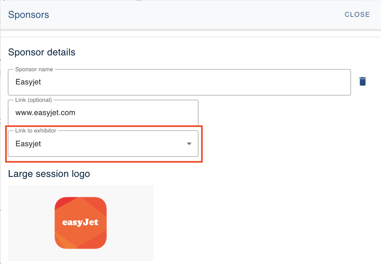
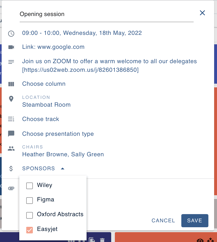
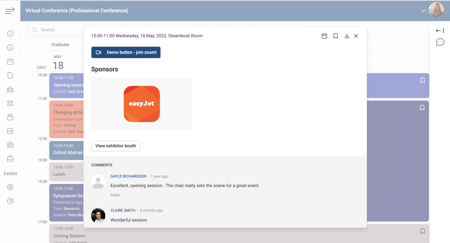
Then, when you select your session sponsors, if they have a corresponding exhibitor booth, a link will show in the session for attendees to view the booth.
---
Read how exhibitors configure their booth and the end user experience [here.](https://help.oxfordabstracts.com/knowledge/professional-conference-exhibitor-feature-exhibitor-set-up?hsLang=en)
- [Introduction to the Oxford Abstracts tools](https://help.oxfordabstracts.com/knowledge/introduction-to-the-oxford-abstracts-tools?hsLang=en)
- [Getting Started and Creating an Account](https://help.oxfordabstracts.com/knowledge/getting-started-and-creating-an-account?hsLang=en)
- [FAQ](https://help.oxfordabstracts.com/knowledge/faq?hsLang=en#main-content)
- [Zoom](https://help.oxfordabstracts.com/knowledge/faq?hsLang=en#zoom)
- [Support](https://help.oxfordabstracts.com/knowledge/support?hsLang=en#main-content)
- [Guidance for submitters](https://help.oxfordabstracts.com/knowledge/support?hsLang=en#guidance-for-submitters)
- [Guidance for committee members](https://help.oxfordabstracts.com/knowledge/support?hsLang=en#guidance-for-committee-members)
- [Guidance for symposia submitters](https://help.oxfordabstracts.com/knowledge/support?hsLang=en#guidance-for-symposia-submitters)
- [Guidance for the conference platform](https://help.oxfordabstracts.com/knowledge/support?hsLang=en#guidance-for-the-conference-platform)
- [Guidance for exhibitors and representatives](https://help.oxfordabstracts.com/knowledge/support?hsLang=en#guidance-for-exhibitors-and-representatives)
- [FAQs for users](https://help.oxfordabstracts.com/knowledge/support?hsLang=en#faqs-for-users)
- [Account Administrator Functions](https://help.oxfordabstracts.com/knowledge/account-administrator-functions?hsLang=en)
- [Getting Started With Your Event](https://help.oxfordabstracts.com/knowledge/getting-started-with-your-event?hsLang=en)
- [The Submission Stage](https://help.oxfordabstracts.com/knowledge/the-submission-stage?hsLang=en#main-content)
- [Preparing for the submission stage](https://help.oxfordabstracts.com/knowledge/the-submission-stage?hsLang=en#preparing-for-the-submission-stage)
- [Designing your submission form](https://help.oxfordabstracts.com/knowledge/the-submission-stage?hsLang=en#designing-your-submission-form)
- [Collecting submissions](https://help.oxfordabstracts.com/knowledge/the-submission-stage?hsLang=en#collecting-submissions)
- [Managing submissions](https://help.oxfordabstracts.com/knowledge/the-submission-stage?hsLang=en#managing-submissions)
- [The Reviewing Stage](https://help.oxfordabstracts.com/knowledge/the-reviewing-stage?hsLang=en#main-content)
- [Preparing for reviewing](https://help.oxfordabstracts.com/knowledge/the-reviewing-stage?hsLang=en#preparing-for-reviewing)
- [Managing reviews](https://help.oxfordabstracts.com/knowledge/the-reviewing-stage?hsLang=en#managing-reviews)
- [The Decision Stage](https://help.oxfordabstracts.com/knowledge/the-decision-stage?hsLang=en#main-content)
- [Preparing for the decision stage](https://help.oxfordabstracts.com/knowledge/the-decision-stage?hsLang=en#preparing-for-the-decision-stage)
- [Recording decisions](https://help.oxfordabstracts.com/knowledge/the-decision-stage?hsLang=en#recording-decisions)
- [Emails](https://help.oxfordabstracts.com/knowledge/emails?hsLang=en#main-content)
- [Creating emails](https://help.oxfordabstracts.com/knowledge/emails?hsLang=en#creating-emails)
- [Sending emails](https://help.oxfordabstracts.com/knowledge/emails?hsLang=en#sending-emails)
- [Creating Exports, Reports and Abstract Books](https://help.oxfordabstracts.com/knowledge/creating-exports-reports-and-abstract-books?hsLang=en)
- [The Conference Platform](https://help.oxfordabstracts.com/knowledge/the-conference-platform?hsLang=en#main-content)
- [Setting up your conference platform](https://help.oxfordabstracts.com/knowledge/the-conference-platform?hsLang=en#setting-up-your-conference-platform)
- [The Professional Conference features](https://help.oxfordabstracts.com/knowledge/the-conference-platform?hsLang=en#the-professional-conference-features)
- [Publishing and managing your conference](https://help.oxfordabstracts.com/knowledge/the-conference-platform?hsLang=en#publishing-and-managing-your-conference)
- [Downloading event timetable](https://help.oxfordabstracts.com/knowledge/the-conference-platform?hsLang=en#downloading-event-timetable)
- [Timezones](https://help.oxfordabstracts.com/knowledge/the-conference-platform?hsLang=en#timezones)
- [Creating announcements for your virtual conference](https://help.oxfordabstracts.com/knowledge/the-conference-platform?hsLang=en#creating-announcements-for-your-virtual-conference)
- [Delegate Registration](https://help.oxfordabstracts.com/knowledge/delegate-registration?hsLang=en#main-content)
- [Publish event](https://help.oxfordabstracts.com/knowledge/delegate-registration?hsLang=en#publish-event)
- [Refunding attendees](https://help.oxfordabstracts.com/knowledge/delegate-registration?hsLang=en#refunding-attendees)
- [Editing Ticket Orders](https://help.oxfordabstracts.com/knowledge/delegate-registration?hsLang=en#editing-ticket-orders)
- [Creating & editing delegate registration events details page](https://help.oxfordabstracts.com/knowledge/delegate-registration?hsLang=en#creating-editing-delegate-registration-events-details-page)
- [downloading invoice and receipts](https://help.oxfordabstracts.com/knowledge/delegate-registration?hsLang=en#downloading-invoice-and-receipts)
- [Multi-Stage](https://help.oxfordabstracts.com/knowledge/multi-stage?hsLang=en)
- [Symposia](https://help.oxfordabstracts.com/knowledge/symposia?hsLang=en#main-content)
- [Preparing for symposia submission](https://help.oxfordabstracts.com/knowledge/symposia?hsLang=en#preparing-for-symposia-submission)
- [Collecting and reviewing symposia](https://help.oxfordabstracts.com/knowledge/symposia?hsLang=en#collecting-and-reviewing-symposia)
- [Managing symposia](https://help.oxfordabstracts.com/knowledge/symposia?hsLang=en#managing-symposia)
- [Guidance For Reviewers](https://help.oxfordabstracts.com/knowledge/guidance-for-reviewers?hsLang=en#main-content)
- [Guidance For Reviewers](https://help.oxfordabstracts.com/knowledge/guidance-for-reviewers?hsLang=en#guidance-for-reviewers)
- [Attending an Event](https://help.oxfordabstracts.com/knowledge/attending-an-event?hsLang=en)
- [Integrations](https://help.oxfordabstracts.com/knowledge/integrations?hsLang=en)
[](http://oxfordabstracts.com)
oxfordabstracts.com Help Center
Copyright © 2026, Oxford Abstracts