
Deleting your Oxford Abstracts account
Easily delete your Oxford Abstracts Account by following the simple steps below.
If you no longer wish to have your Oxford Abstracts account you can now delete it from your account settings.
Note
All content you have uploaded (e.g. submissions) will be automatically deleted and unable to be retrieved once you delete your account.
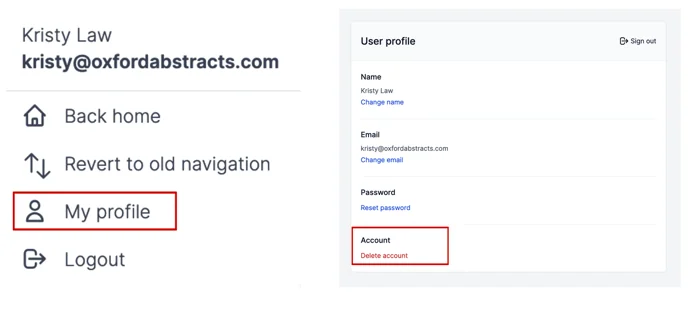
To delete your account, from your dashboard click on your email address at the t op right of the page.

Select My Profile, scroll down to Account, and Click on Delete Account and follow the instructions.
A box will appear on the next screen that you will need to type in DELETE and click on Confirm Deletion to delete your account.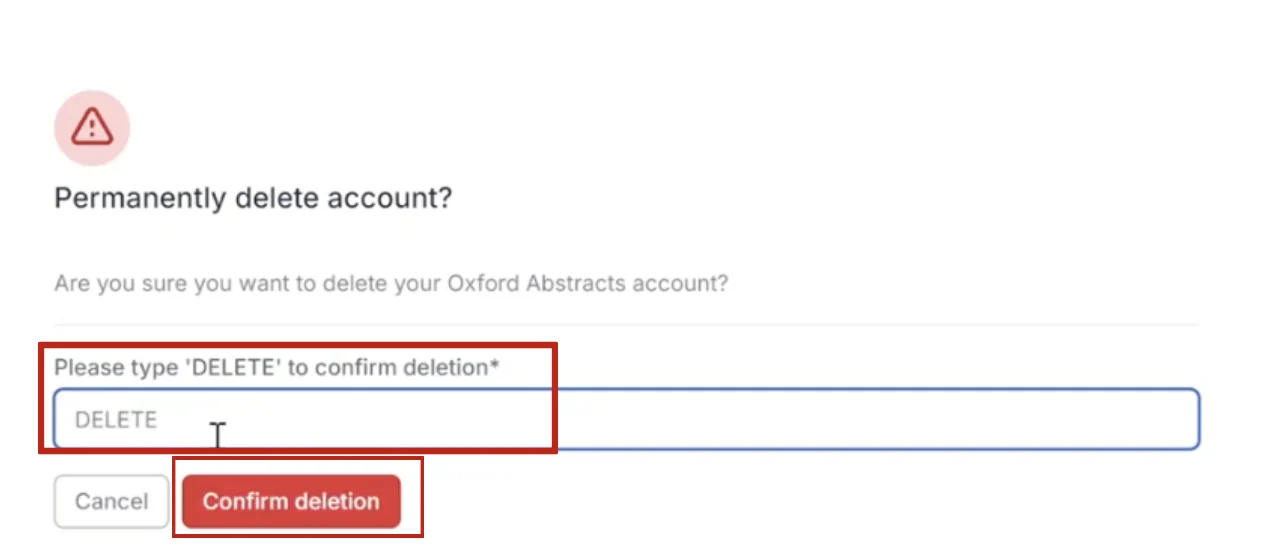
Note
If you have uploaded content (an abstract etc) then you may receive the following instructions on the screenshot below.
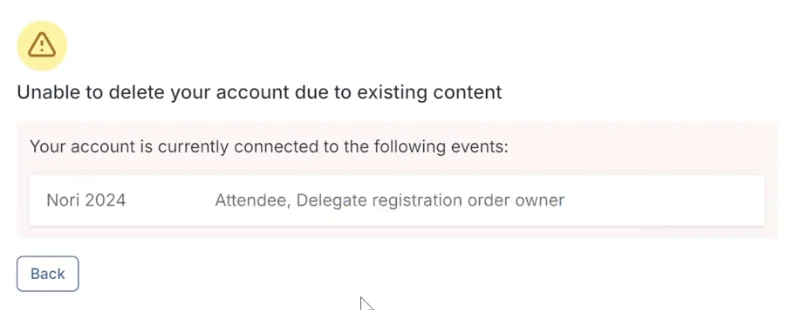
If this happens, please contact the Event Administrator of the event your account is linked to so they can delete it.
Should you need further assistance, please contact our Support Desk via this Contact Form.
Was this article helpful?
Contact supportRelated
Still stuck? Send us a ticket
Tell us what you're trying to do and one of our support team experts will come back to you promptly with the solution.