
Symposia decisions & emails
The last stage: recording outcomes for your symposia and telling people about them. Both work like their abstract equivalents, with templates written for symposia.
Recording decisions#
Go to Event dashboard → Symposium → Decisions.
Decisions are made in the symposium decisions table exactly as they are in the submissions decisions table, so follow Recording a decision.
To withdraw a symposium rather than reject it, see Managing symposia.
Symposia emails#
Go to Event dashboard → Emails → Edit & Send → Symposium.
The email tool works as it does elsewhere, so it is worth being familiar with creating and sending emails first.
Automatic emails#
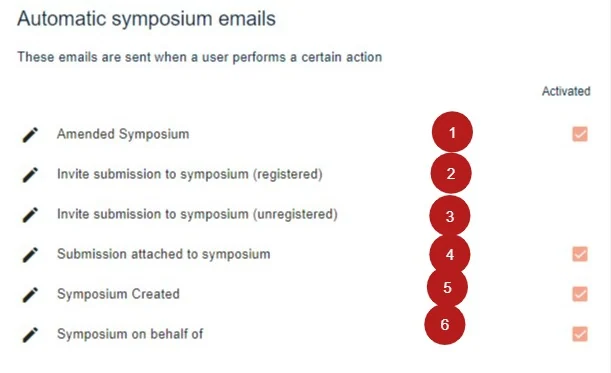
These send themselves when something happens. There are six, triggered when:
- A symposium submitter logs in and amends an existing symposium.
- A submitter invites a registered user to submit an abstract to their symposium.
- A submitter invites an unregistered user to do the same.
- A submission is attached to their symposium.
- They create a symposium.
- A symposium is submitted on their behalf.
Manually sent emails#
These you send yourself, when you are ready.
To symposium submitters:
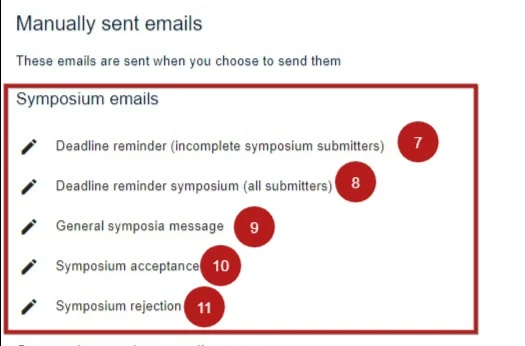
- those whose submissions are incomplete
- all submitters, regardless of status
- a free template for any other announcement
- those whose symposia have been accepted
- those whose symposia have been rejected
To reviewers:
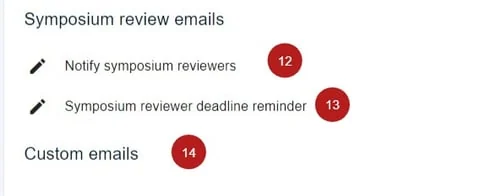
- notify them that reviewing is open
- remind them of the reviewing deadline
- a free template for a custom email
For how to send them in batches, see Symposia reviewing.
Was this article helpful?
Contact supportRelated
Still stuck? Send us a ticket
Tell us what you're trying to do and one of our support team experts will come back to you promptly with the solution.