
Chasing up late reviews
You may want to chase up reviewers if their reviews are incomplete and the deadline is approaching.
To get an overview of how many reviews are incomplete, go to Event dashboard → Abstract Management → Reviews → By reviewer.
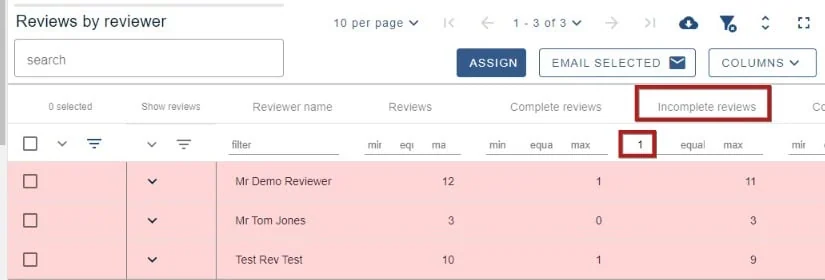
Ensure you have the column Incomplete reviews on display in the table. Enter '1' in the minimum field shown below. Those who have at least 1 incomplete review will appear in the table.
There are two ways of contacting late reviewers
Through the email from tables feature#
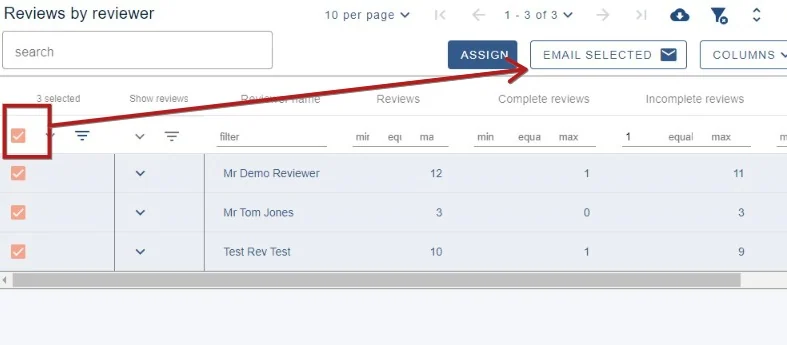
Select all using the top checkbox to the left of the screen, and click Email selected.
Follow the emails from tables guidance to complete and send your email.
Through the template emails#
Note
This option will send a reminder to all reviewers, regardless of whether they have completed their reviews
Go to Event dashboard → Emails → Edit and send
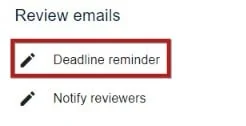
Then scroll to the Reviews email towards the end of the page and choose Deadline reminder
Edit your email as required, then follow Sending and scheduling emails to send your email.
Was this article helpful?
Contact supportRelated
Still stuck? Send us a ticket
Tell us what you're trying to do and one of our support team experts will come back to you promptly with the solution.