
Controlling what the reviewer can see
You can determine which questions' responses will be visible to the reviewer, along with the submitters' individual information (eg. name and email address).
Go to Event dashboard → Abstract Management → Reviews → Forms & Setup
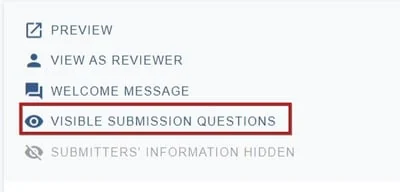
At the top of the screen, choose Visible submission questions
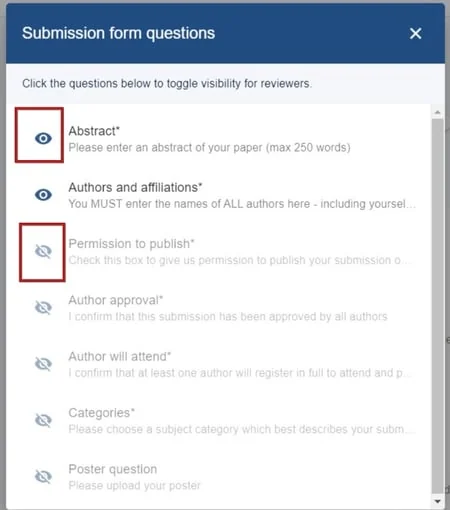
Click the eye icon to toggle visibility on and off to your requirements. Changes are saved automatically.
This can also be set up in the submission form. See below.
Double blind review settings#
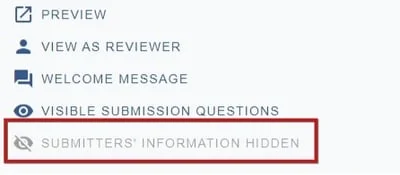
At the bottom of the settings, you will see that the default is for submitters' information to be hidden from reviewers. If you would like this information to be visible to reviewers, click on the eye icon.
Go to Event dashboard → Form → Submission form
Click on any question. On each question you can apply 'tags'.
Click the Show reviewer checkbox at the bottom of the screen if you would like the responses of this question to be shown to the reviewers. All changes are saved automatically.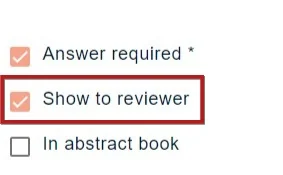
When back in the submission form edit view, you will see the Reviewer tag under the question.

Common questions#
How do I control what data the reviewer can view in the submissions?#
See Question tags.
Was this article helpful?
Contact supportRelated
Still stuck? Send us a ticket
Tell us what you're trying to do and one of our support team experts will come back to you promptly with the solution.