
Word and character count
On text questions, you can add a word or character limit, if you wish.
From your go to Event dashboard → Abstract Management → Submission → Form & Setup → Submission form
Click on any text editor question.
All text editor type of questions (including the abstract question), allow you to enter a word or character limit.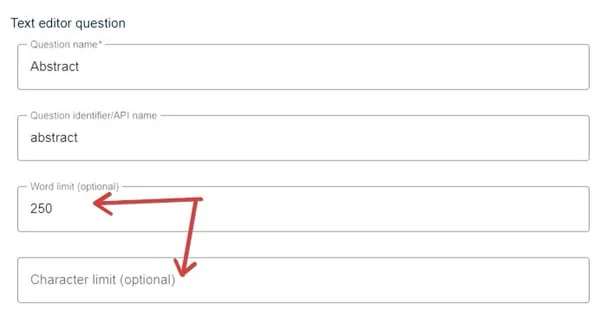
Although you can enter a value for each, when the submitter reaches the lower of the two, they will be alerted that they are over the limit.
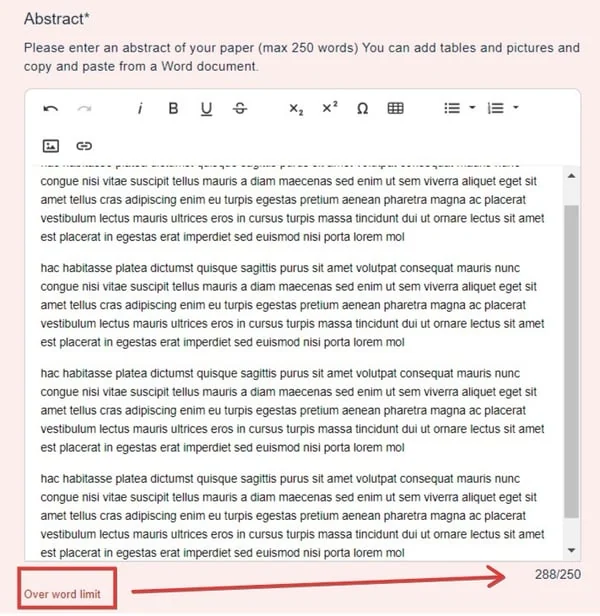
Note
Although the user can still submit, their submission will be marked as incomplete.
Discrepancies with word count#
When text contains a lot of numerical data and symbols, there can be discrepancies with word count when copying and pasting from Microsoft Word or other text editors into the Oxford Abstract forms. Different systems have many varying calculations, with no standard set of algorithms, and this can result in word count over the permitted maximum.
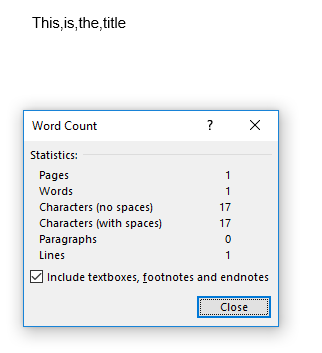
For example. Microsoft Word counts the following text as 1 word.
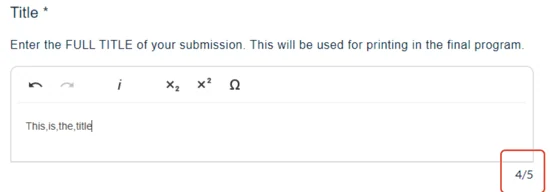
However, when copying to a submission form, this is shown as 4 words.
For guidance: the following count as one word on Oxford Abstract's system
1+1=2
n=23
P>2.5
(p<4.5)
whereas the following items count as two words on our system but only as one on Microsoft Word.
and/or
up(down)
all,around
To permit the submissions affected by these discrepancies, you can increase the word count above the stated amount after the deadline to give authors a bit of leeway. This will result in all those submissions that have gone over the threshold to be submitted as complete.
Common questions#
Users have reported that the abstract field in the submission form is alerting them that they are over the word limit? How can I resolve this?#
This is usually a counting difference rather than a genuine overrun. Word counts text containing numbers and symbols differently from the submission form — and/or is one word in Word and two here. There are more examples under Discrepancies with word count above.
To let the affected submissions through, increase the word limit above the stated amount after the deadline. Every submission that had gone over the threshold is then marked as complete.
Was this article helpful?
Contact supportRelated
Still stuck? Send us a ticket
Tell us what you're trying to do and one of our support team experts will come back to you promptly with the solution.