
Changing the email address on a registration
Here you can find instructions on how to change a registration email address for delegate registration.
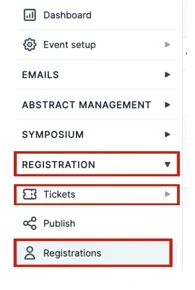
From your Event Dashboard, on the l eft-hand column, click on Registration → Tickets → Registrations.
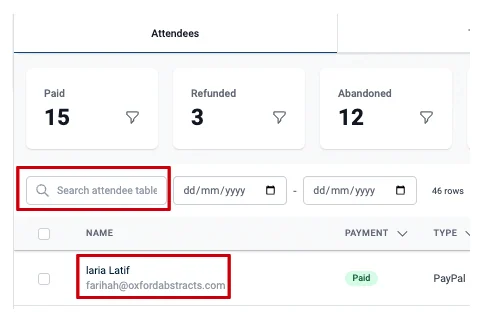
Search for the attendee you want to change the registration email address in the s earch box at the top left of the table and then click on their name.
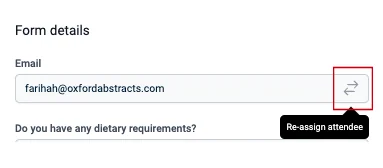
On the column that appears to the right of the screen, under F orm Details, click on the arrow symbol under the email tab.
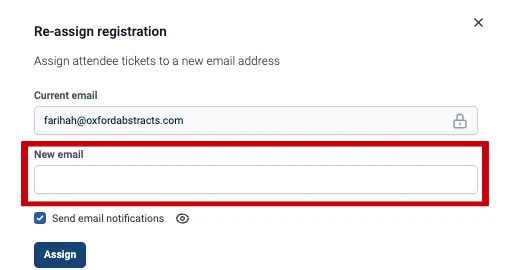
Add the new email address to the New Email tab.
If you want to notify both attendees of the change, make sure the Send Email Notifications box is ticked and click on the eye symbol to view the emails that will be sent to each attendee.
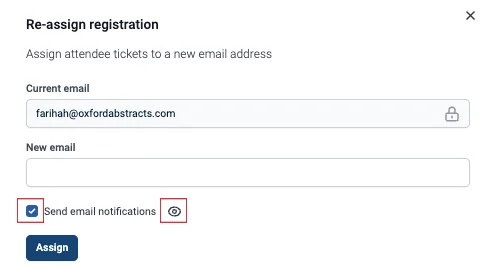
If you do not want to send an email, then please untick this box.
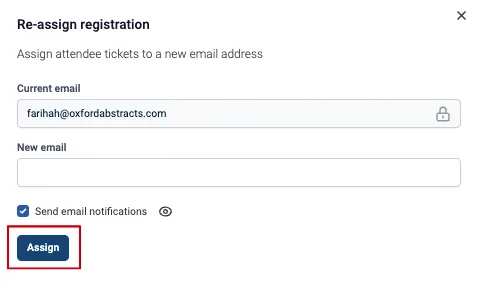
Then click the Assign button to make the changes.
Should you need any further assistance, please get into touch with our Support Desk via this Contact Form.
Was this article helpful?
Contact supportRelated
Still stuck? Send us a ticket
Tell us what you're trying to do and one of our support team experts will come back to you promptly with the solution.