
← Back to results
Combined word count
For event organisersLast reviewed 28 July 2026
You can set a combined word count over multiple questions (short text and text editor questions). This works well for questions that work as separate elements of an abstract, e.g. background, objective, method, results, conclusions.
Submitting, reviewing or attending? This guide is for event organisers. Find help for your role.
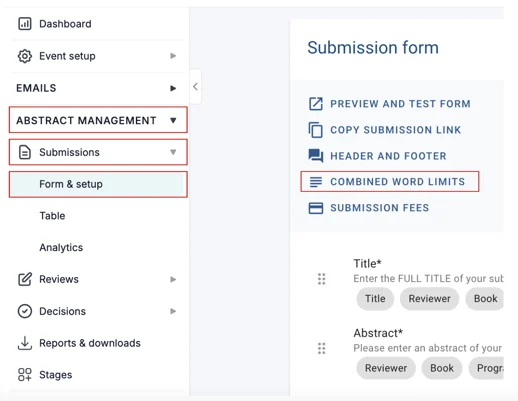
Go to Event dashboard → Abstract Management → Submission → Form & Setup →Combine Word Limits.
All short text and text editor questions will be displayed.
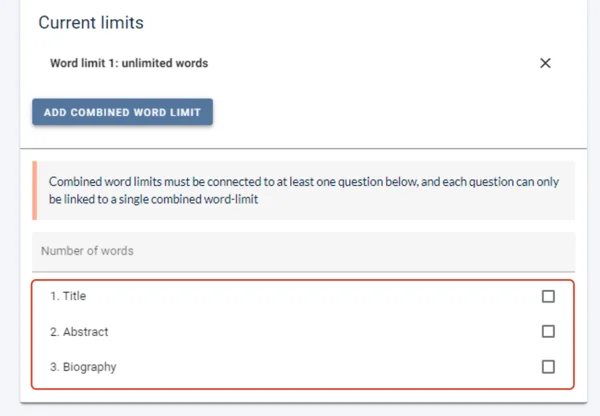
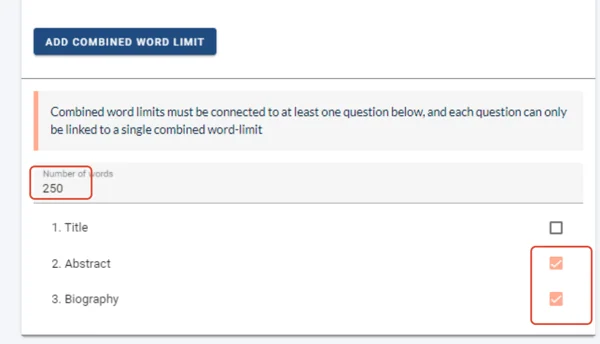
Enter a word limit and choose which questions you would like the word limit to apply to.
Removing a Combined Word Count
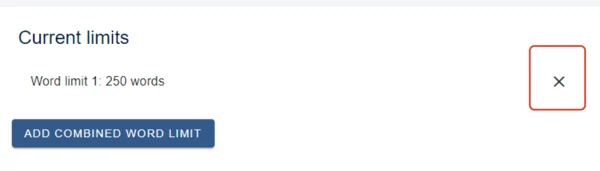
To remove a combined word count, click the x alongside the relevant one under Current limits.
Was this article helpful?
Contact supportRelated
Still stuck? Send us a ticket
Tell us what you're trying to do and one of our support team experts will come back to you promptly with the solution.