
Accessing reviews from previous stages
If you have set up a multi stage sequential event, you may wish to access reviews from a previous stage.
Go to Event dashboard → Abstract Management → Reviews → By submission
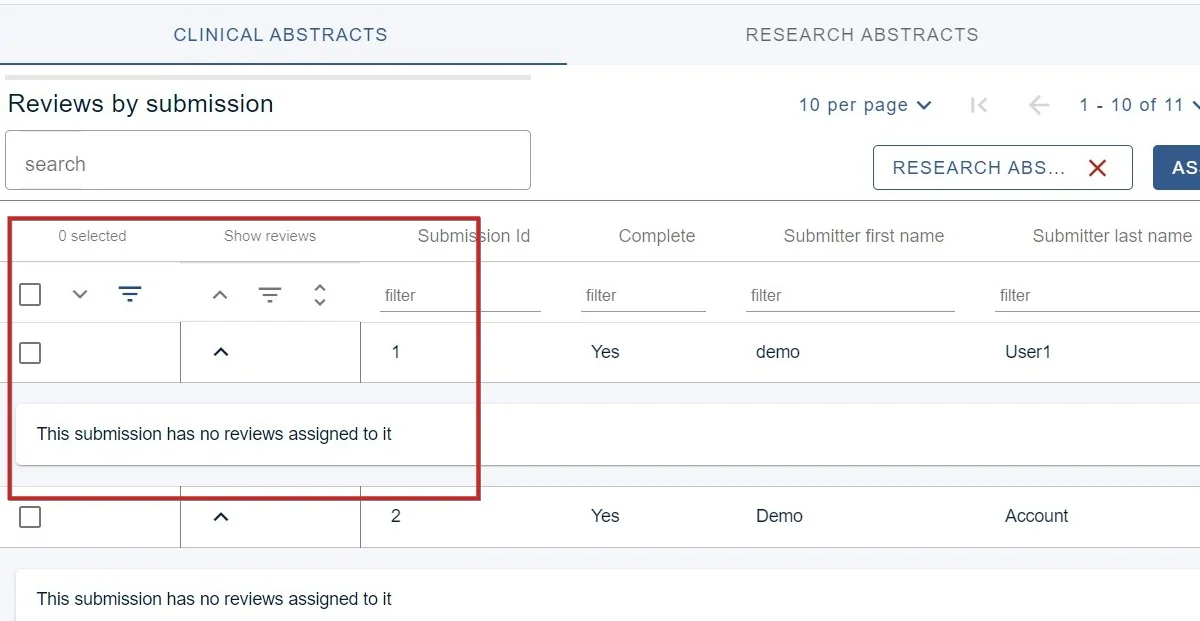
You will see from the view below, the 1) Clinical Abstracts reviews are displayed in the table. You will also see a 2) Other stages dropdown menu to the left of the Assign reviewers button.
3) Click the down arrow to reveal the child rows (ie the reviews) for the reviews of a particular submission.
Choose the stage in the 2) Other stages menu to reveal the reviews (in this case, the reviews that took place in the Research abstracts stage
In the example below, there are none.
Click the red X in the Other stages dropdown to return to the reviews in the Clinical abstracts stage
Was this article helpful?
Contact supportRelated
Still stuck? Send us a ticket
Tell us what you're trying to do and one of our support team experts will come back to you promptly with the solution.