
← Back to results
Checking your submission status
For people making a submissionLast updated 24 November 2026
What each label under your submission means, from 'Incomplete' to the decision.
Sign in and click View on the event. The labels under each submission in the Submissions card show where it stands. Only the labels the event uses appear.
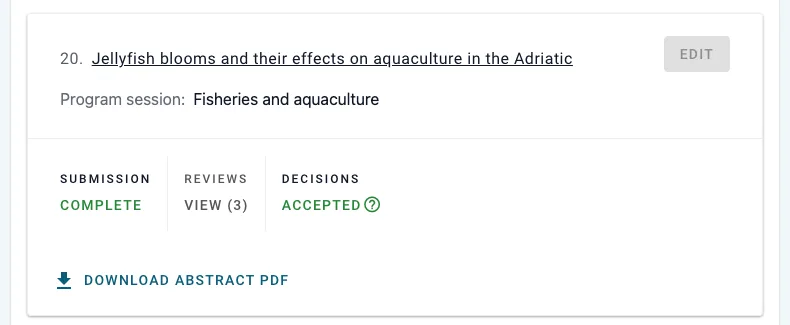
- Submission: Complete or Incomplete. Click it to open the form, if the organisers allow edits.
- Co-authors: Complete when every author has filled in their author form. View incomplete lists who hasn't.
- Payment: Complete, Not paid, Pending, Processing or Failed. See Paying for your submission.
- Reviews: View (2) or No reviews. See Accessing your reviews.
- Symposium: Attach or View. See Attaching your submission to a symposium.
- Decisions: Pending, Accepted, Rejected or Withdrawn. Point at Accepted to see the acceptance type, such as oral or poster. Apart from Withdrawn, decisions only appear once the organisers share them.
- Program session: links to your session once the program is published.
Common questions#
My decision still says "Pending"#
It hasn't been decided or released yet. The organisers may show the date as Outcome notification at the top of the card.
Why is "Edit" greyed out?#
The organisers have closed editing ("Edits disabled for this submission"). See Editing an abstract or submission.
Was this article helpful?
Contact supportRelated
Still stuck? Send us a ticket
Tell us what you're trying to do and one of our support team experts will come back to you promptly with the solution.