
Seeing a submission you're a co-author on
If you're named as an author on someone else's submission, you can view it and download it from your dashboard.
If someone names you as an author on their submission, you can see it on your dashboard, as long as the organiser allows it.
- Sign in with the email address the submitter entered for you. If you don't have an account with that address, create one.
- Click View on the event and look for Co-author submissions.
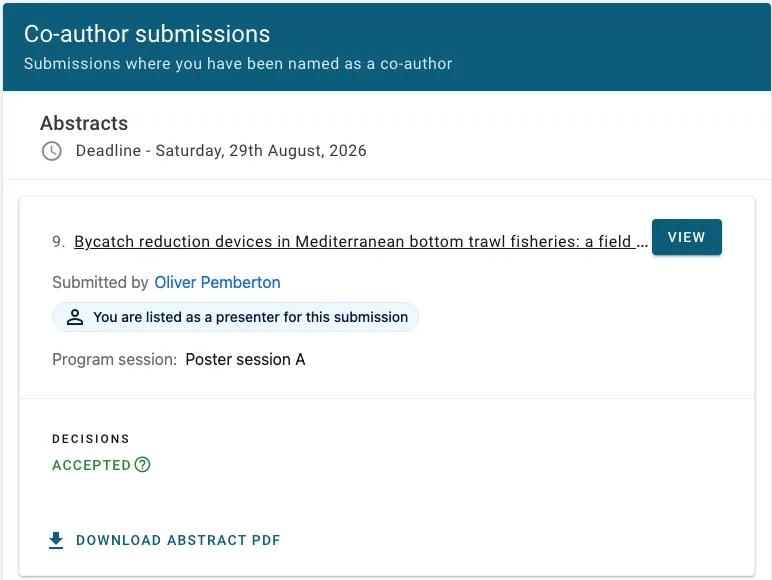
Click View to read the submission or Download abstract PDF to download it. You'll also see the decision once it's released, and a Program session: link once the program is published.
Only the submitter, named under Submitted by, can edit it, upload files, pay, download the receipt, see reviews or attach it to a symposium. To take it over, ask the organiser to change its owner.
Author forms#
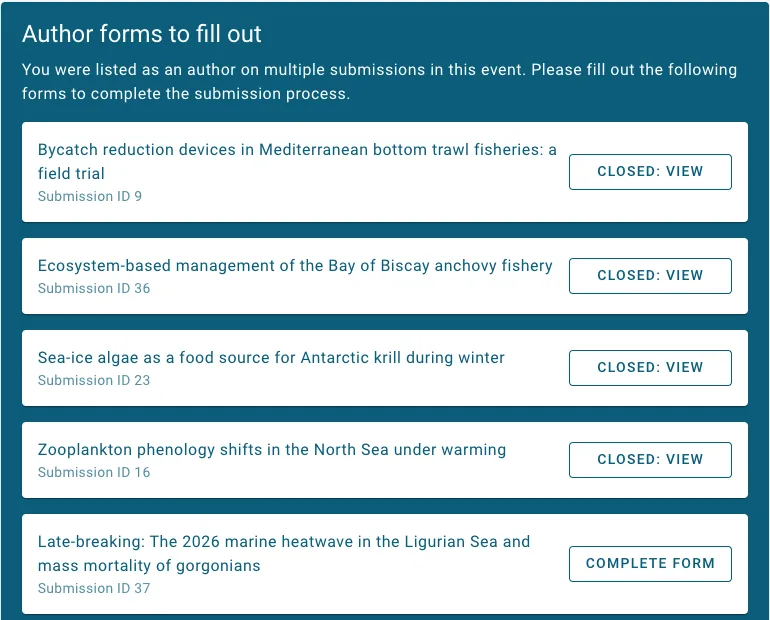
If the organiser asks authors questions, Author forms to fill out appears on the event's dashboard. Click Complete form. Afterwards the button reads Edit, or Closed: view once the organiser closes the form.
Common questions#
I can't see a submission I'm named on#
Check you're signed in with the address the submitter entered, and ask them to correct it if not. Otherwise the organiser may not show submissions to authors; contact them.
Was this article helpful?
Contact supportRelated
Still stuck? Send us a ticket
Tell us what you're trying to do and one of our support team experts will come back to you promptly with the solution.